
A plain text message gets a few seconds of attention at best, and most of them are wasted on a link the customer never taps. RCS messaging changes the maths by letting your campaign arrive with a verified name, an image and buttons that do the work for you. If your SMS campaigns have started to feel flat, or you’re curious about marketing with RCS text messaging but not sure where to begin, this guide walks through the practical choices that lift engagement, from design and timing to measurement.
What is RCS messaging and why does it matter for marketers?
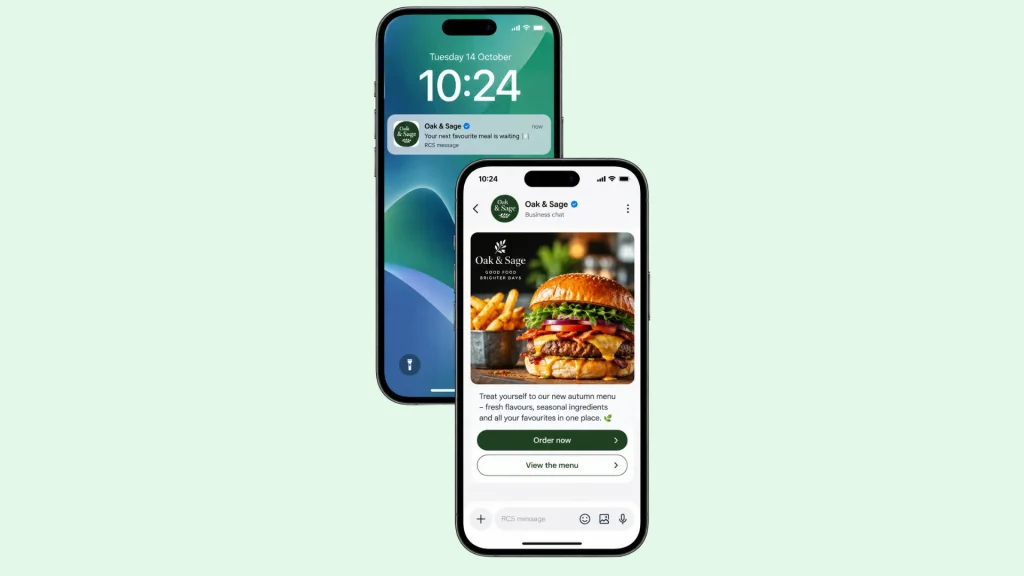
RCS stands for Rich Communication Services. Think of it as the next generation of text messaging, delivered through the standard messaging app on a customer’s phone, so there’s nothing for them to download or sign up to. Where SMS is limited to plain text, RCS messages can carry high resolution images, video, swipeable carousels, tappable buttons and your verified business name and logo.
The bigger change for marketers isn’t how the message looks, it’s what the customer can do with it. Every RCS message can contain something to tap, which means a campaign no longer has to ask people to go somewhere else. It becomes a small, interactive experience that starts and finishes inside the conversation. Support has grown since Apple added RCS to iPhones with iOS 18, so your campaigns can reach customers on both major platforms, although availability still depends on the device and the mobile network. You can find out more about RCS for business on our website, and the industry standard behind RCS is maintained by the GSMA.
Is RCS better than SMS for marketing?
It depends on what the message needs to do. SMS is universal and brilliant for short, urgent updates such as delivery slots or one time passcodes. RCS is better when you want to show something, offer choices or collect a quick answer. Most businesses find the strongest approach uses both, with RCS leading richer campaigns and SMS acting as the safety net for customers whose phones can’t display them. You don’t have to pick a side, you just need to give each channel the job it does best. If you already send texts through our self service SMS Portal, you’ve got a head start on the audience and consent groundwork.
Build every message around one next tap
The most common mistake with rich messaging is treating the extra space as an invitation to say more. Resist it. Before you design anything, decide the single action you want the customer to take in the next ten seconds, whether that’s booking a slot, confirming an appointment, browsing an offer or replying with a preference. Then make that action the most obvious thing in the message.
Imagine a garage reminding customers that their MOT is due. A strong RCS message uses a clear image, one short line explaining why the message matters, and a primary button reading Book a slot. A secondary quick reply such as Remind me next week keeps customers who aren’t ready from simply ignoring you. Two options feel effortless, while five feel like homework.
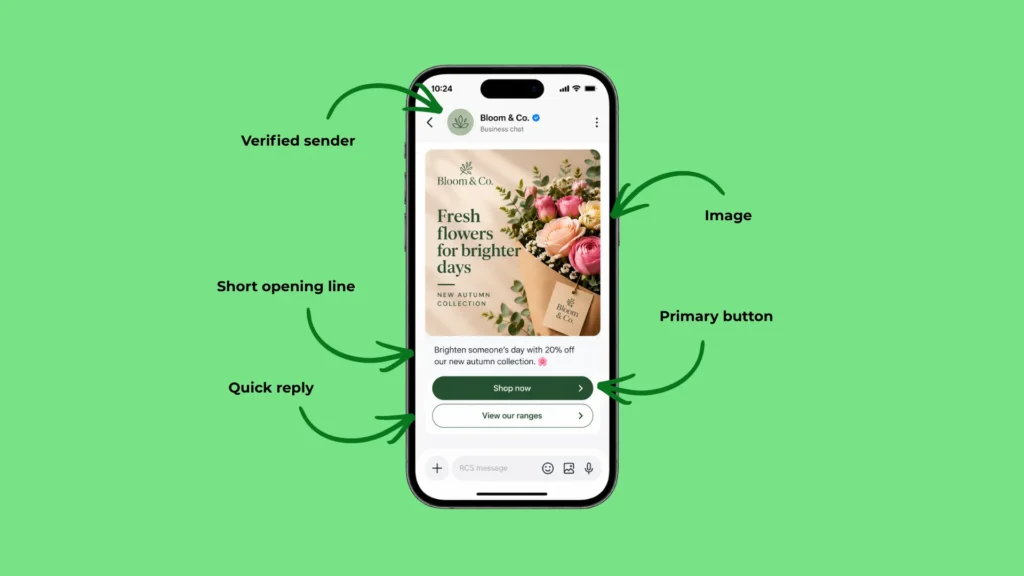
Suggested replies deserve special attention because they remove the biggest barrier to responding, which is typing. Short, specific labels such as Mornings or Afternoons tend to work better than vague ones like Click here, because the customer knows exactly what will happen when they tap.
Make the first glance do the work
Customers decide whether to engage before they read a word. In an RCS campaign, that decision rests on three things: the verified sender name and logo, the opening line that shows in the notification, and the image. Get these right and the rest of the message has a fighting chance.
Put your reason for messaging in the first line, because notification previews cut text off quickly. Choose imagery that shows rather than decorates, such as a product in use, the venue itself or the exact service on offer. Avoid text heavy graphics, as the copy and buttons can carry the words and the image should carry the feeling. Keep your tone consistent with how you speak elsewhere, so the message reads like it came from a business the customer already knows. If you’d like to start simply, our Basic RCS and Single RCS options are a sensible place to begin.
Use carousels as a shop window
Carousels let customers swipe through several cards, each with its own image, headline and button. They work best when the customer’s decision involves choosing between a few things, for example three service packages, this week’s new arrivals or a seasonal menu.
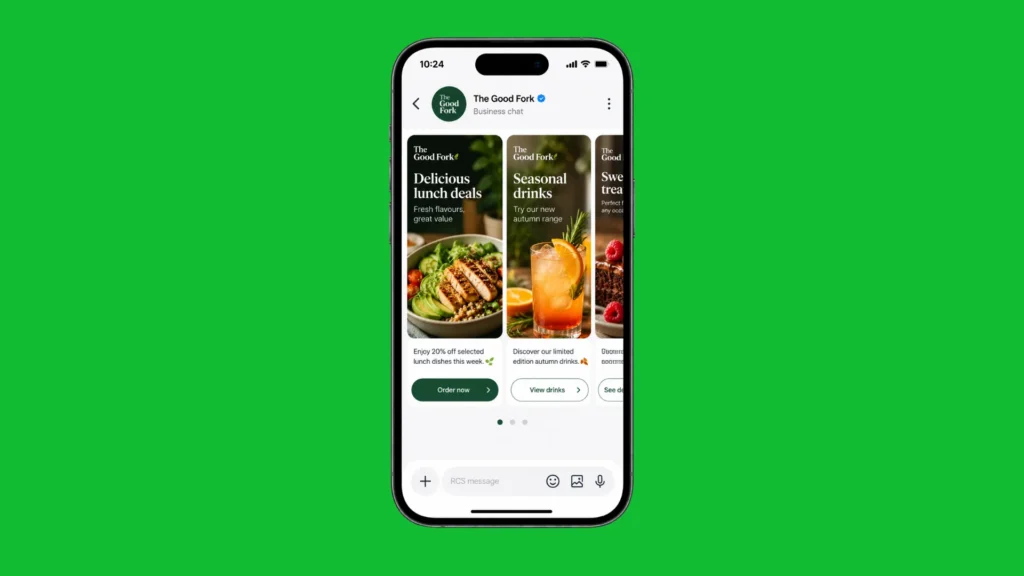
Treat the carousel like a shop window. Lead with the card most relevant to that customer, keep the set to a handful of cards so nobody loses interest, and give every card its own clear button instead of one general link at the end. A garden centre, for instance, could show spring planting bundles to customers who bought bulbs last autumn, and compost and tools to those who’ve only ever bought houseplants. Same format, entirely different relevance. It’s also worth previewing carousels on different handsets, as the display can vary slightly between devices, and Google’s guidance on rich cards and carousels is a useful reference when you’re designing them.
Turn campaigns into conversations
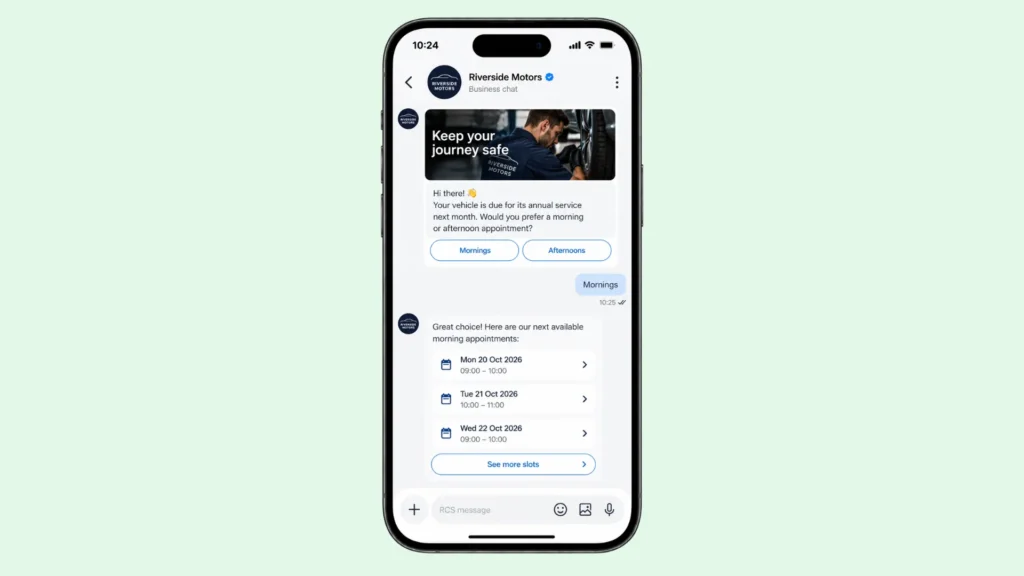
Rich messaging really comes alive when customers can answer back. Conversational RCS lets you guide someone through a short exchange, asking a question, responding to the answer and moving them towards an outcome without a phone call or a web form.
A dental practice sending recall reminders is a good example. Instead of a generic nudge to call the surgery, the message asks whether mornings or afternoons suit the patient better, offers two reply buttons, then follows up with available slots. The patient books in moments, and the practice has captured a preference it can use next time. The same approach suits feedback requests, preference gathering and appointment confirmations, all areas where a quick reply beats a long form.
Seven RCS campaign ideas, each with an SMS fallback
Here are seven campaign ideas to get you started, each paired with a plain SMS version for customers who can’t see the rich one. Treat the fallback as a proper message in its own right, not an afterthought.
Appointment confirmations. RCS idea: send a reminder with a photo of the venue or practitioner, then two buttons reading Confirm and Change time. SMS fallback: keep it short with the date, time and place, then ask the customer to reply YES to confirm or CHANGE to rearrange.
Left behind basket nudges. RCS idea: show the items in a small carousel, each with its own Buy now button, so customers can finish in a couple of taps. SMS fallback: name the main item, mention that it’s still waiting and add one short link back to the basket.
New arrival or seasonal launch. RCS idea: lead with a carousel of three standout products, ordered by what each segment has bought before, with a Shop this one button on every card. SMS fallback: pick the single strongest product, add the launch offer and end date, then share one link.
Event or open day invitations. RCS idea: open with a striking image and offer three buttons, Count me in, Maybe later and Tell me more, so the customer can answer without typing. SMS fallback: state the date and place in the first sentence, then invite people to reply with a keyword to save a place.
Quick feedback requests. RCS idea: ask how the visit went with five suggested reply buttons, one to five, then follow up with an open question only for lower scores. SMS fallback: ask for a score from one to five by reply, and send a thank you whatever the answer.
Loyalty and reward reminders. RCS idea: show the points total on a branded card with a Redeem now button and a gentle nudge about expiry. SMS fallback: give the total, the expiry date and a short link or a keyword to reply with.
Win back campaigns. RCS idea: greet lapsed customers with a carousel of what’s new since their last visit and a Come back and save button. SMS fallback: write one friendly line, mention a single reason to return and include the offer code in plain text.
Pick one idea, build it properly and test it before you scale it across your whole audience.
Segment first, then personalise
Personalisation works best when it reflects what customers have actually done, not just what they’re called. A first name in the greeting is pleasant, but a reference to their last purchase, their usual appointment day or their preferred location tells them the message was meant for them.
Start with two or three simple segments based on behaviour, such as recent customers, regulars and people who haven’t been in touch for a while. Each group should get a different message with a different image and a different button. Recent customers might receive a thank you with aftercare tips, whereas lapsed customers might see a carousel of what’s changed since their last visit. Sending fewer, more relevant messages almost always beats sending one message to everyone.
Send at the right time, not just the usual time
Timing is part of the creative. Appointment reminders belong a day or so beforehand, delivery updates belong when something changes, and promotions belong when customers are likely to be thinking about buying, rather than first thing on a Monday because that’s when the schedule says so. Avoid early mornings and late evenings unless the message is genuinely time sensitive.
Think in sequences rather than blasts. A short run of messages, for example a teaser, a reveal and a gentle last chance reminder spaced a few days apart, gives customers more than one chance to act without feeling pestered. Then give them a rest. A quiet period after a campaign protects the relationship and keeps opt out rates low.
Whatever you send, the legal basics still apply. Under PECR, marketing by text generally needs the customer’s consent, or a valid soft opt in, and every message should make it easy to say no. The ICO’s guidance on electronic marketing is the best place to check your approach.
Plan your SMS fallback properly
Not every customer will see the rich version of your message, because RCS depends on the handset, the messaging app settings and the mobile network. When a fallback is set up, a message that can’t be delivered as RCS drops back to SMS, so write the core of it so it still makes sense as plain text. That means a clear first sentence, a short link and a single instruction. Check your reporting by channel too, so you know how many customers saw each version and can judge results fairly.
Measure what matters and test one thing at a time
Because RCS messages are interactive, you can measure far more than opens. Look at button taps, reply rates, conversions, revenue per message and opt outs. Together these show whether a campaign is genuinely engaging customers or simply getting seen.
Test with discipline. Split a similar audience in two and change one thing at a time, such as the image, the button label or the send time, so you know what caused any difference. Running the same offer through RCS and SMS to matched groups is the cleanest way to see what the richer format adds for your business, and the results will tell you where to invest next. If you’d like to see how this thinking extends across the whole customer journey, from first enquiry to repeat purchase, our wider RCS guide is a good next read.
Ready to try RCS messaging for your business?
Engaging campaigns come down to a few habits: one clear action per message, imagery that earns attention, relevance for each segment, thoughtful timing and honest measurement. RCS messaging gives you the tools to do all of that inside the app your customers already check every day. Whether you’re planning your first campaign or want to improve what you already send, the Text Management team can help you choose the right RCS option and set it up properly. Explore our RCS for business page to see what’s possible, or get in touch to talk through your next campaign.

